How an AI Text Enhancer Can Transform Your Writing
Discover how a powerful AI text enhancer can elevate your writing. Learn to improve clarity, refine your tone, and boost productivity with practical tips.
Ever found yourself staring at a perfectly fine sentence that just… doesn't work? It's grammatically correct, but it lacks punch. It’s clear, but not compelling. This is exactly where an AI text enhancer comes into play. It's more than a spell checker; think of it as a writing partner that helps you refine your ideas, sharpen your language, and make sure your words land with the right impact.
What's Really Happening Under the Hood?
Let's get one thing straight: an AI text enhancer isn't just a glorified grammar tool. It's a creative assistant, a co-pilot that helps you navigate the complexities of language to get your point across more effectively.
The engine driving these tools is a Large Language Model (LLM), the same technology that powers things like ChatGPT. These models have been trained on an incredible amount of text from across the internet—books, articles, and websites. This massive library gives them a deep, almost intuitive understanding of context, style, and flow.
When you feed your writing into an enhancer, it doesn't just scan for errors. It reads for meaning and intent, then suggests improvements to make your writing stronger, clearer, and more persuasive.
The Editor Analogy
The best way to think about it is by comparing it to a human editor. A basic spell checker is like a proofreader—it catches obvious typos and grammatical slips. An AI text enhancer, on the other hand, acts like a developmental editor.
It dives deeper, asking the important questions:
- Could this sentence be clearer?
- Is there a more powerful word I could use here?
- Does the tone feel right for who I'm trying to reach?
It’s not about replacing your voice, but amplifying it. The goal is to polish your own ideas, not to invent new ones. This distinction is critical in a booming market. The AI-generated content space, which includes these enhancers, has already hit USD 12,879.0 million, with text tools carving out a 21.6% share of that revenue.
AI Text Enhancer Capabilities at a Glance
To give you a clearer picture, this table breaks down what these tools are designed to do. They handle the nuanced work that goes beyond simple error correction, which is what separates them from basic grammar checkers.
| Feature | What It Does | Example Application |
|---|---|---|
| Clarity Improvement | Rewrites confusing or wordy sentences to be direct and easy to follow. | Turning "The implementation of the new system will be effectuated" into "We will implement the new system." |
| Tone Adjustment | Tweaks phrasing to sound more professional, friendly, or persuasive. | Changing "You must complete the report" to the more collaborative "Let's aim to complete the report." |
| Vocabulary Enhancement | Swaps out common words for more precise and impactful synonyms. | Upgrading "The project was good" to "The project was innovative and successful." |
| Flow & Readability | Smooths out transitions between sentences and paragraphs for better flow. | Adding phrases like "On the other hand" or "As a result" to connect ideas logically. |
These tools are incredibly useful for refining your writing, but they aren't magic. They can’t verify the facts in your article or come up with a groundbreaking argument from scratch. For instance, tools like Postline AI are fantastic for sharpening existing content but still rely on your expertise for the core substance.
At the end of the day, an AI text enhancer takes care of the tedious polishing work, freeing you up to concentrate on the big picture: your message, your story, and your ideas.
What These Tools Actually Do (And Why It Matters)
An AI text enhancer is so much more than a glorified spell-checker. Think of it less like a proofreader and more like a seasoned editor who works at the speed of light, refining your writing on multiple levels. These tools are packed with specific functions built to solve the real-world problems writers face, helping turn a decent draft into something polished and powerful.
Once you see what's under the hood, you'll understand the real-world benefits. Clearer content, for instance, dramatically improves the reader's experience, which is a massive factor in keeping people engaged. By handling the tedious bits of editing for you, these tools let you get back to focusing on what really matters: the quality of your ideas.
Nail Your Delivery with Tone Adjustment
One of the most impressive features is tone adjustment. The exact same message can come across in completely different ways based on how you say it. An AI text enhancer can instantly rework your writing to sound more professional, casual, persuasive, or even academic, making sure your tone is always a perfect match for your audience and goal.
This isn't just about swapping out a few words here and there. The AI actually restructures sentences to capture a specific mood. A formal business report needs a totally different voice than a friendly team email or a punchy marketing slogan.
Before (A bit stuffy and corporate):
"It is imperative that all personnel submit their weekly status reports by the Friday deadline to ensure operational continuity and facilitate accurate project tracking."
After (Casual and friendly):
"Hey team, just a quick reminder to get your weekly status reports in by Friday. This really helps us keep everything on track and running smoothly."
With a single click, you can maintain a consistent brand voice everywhere or adapt your style on the fly without having to rewrite everything from scratch.
Get to the Point with Perfect Clarity and Conciseness
We’ve all done it—written sentences that are way too long or packed with jargon. These are the exact kinds of writing habits that make readers tune out. AI text enhancers are brilliant at improving clarity and conciseness. They slice through convoluted phrases and chop out fluff, leaving your core message sharp and easy to grasp.
It’s like having a filter that strips away all the noise, letting your main point shine. The end result is content that’s simply easier to read and digest, which is absolutely essential for holding your audience's attention.
- Breaks down complexity: It splits long, winding sentences into shorter, punchier ones.
- Cuts the fluff: The tool spots and removes repetitive words and filler phrases that add zero value.
- Boosts readability: By simplifying the text, it makes your writing accessible to more people—a golden rule of great communication.
Sharpen Your Language with Vocabulary Enhancement
Using the same handful of words over and over again can make your writing feel stale. This is where vocabulary enhancement comes in. The AI suggests more dynamic, precise, and interesting words to bring your text to life.
It’s smart enough to understand the context, so it offers synonyms that aren’t just different, but better. This helps you sidestep clichés and make your writing more memorable, whether you're building a persuasive argument or painting a vivid picture. For example, instead of just saying "good," the tool might suggest "exceptional," "insightful," or "effective," depending on what fits best.
A strong vocabulary is the bedrock of powerful writing. An AI enhancer is like having a personal thesaurus that understands context, enriching your text without ever making it sound robotic or unnatural.
Improve the Rhythm with Structural Rephrasing
Finally, a great AI text enhancer looks at the big picture: the overall flow and rhythm of your writing. The structural rephrasing feature moves beyond single words and sentences to improve how your paragraphs link together and how your ideas unfold.
It might suggest reordering a few sentences to build a more logical argument or pop in a transition to guide the reader smoothly from one point to the next. This ensures your writing feels less like a collection of correct sentences and more like a cohesive, compelling story. This holistic view can save you hours of painful editing and even help you break through writer's block by showing you new ways to arrange your thoughts.
How to Choose the Right AI Text Enhancer
With so many AI text enhancers popping up, picking the right one can feel overwhelming. It's easy to get lost in a sea of features, but the secret is to tune out the noise and focus on what you actually need. The best tool for a student writing a research paper is rarely the same one a marketer needs to craft a killer ad.
This explosion in choice isn't surprising. The generative AI market is on track to hit USD 62.72 billion, growing at a staggering 41.53% CAGR through 2030. This boom really kicked off when tools like ChatGPT snagged 1 million users in just 5 days. Now, over 1.8 billion people worldwide use AI tools for everything from drafting emails to building entire campaigns. You can learn more about the rapid adoption of AI writing tools to see just how deeply they're changing the game.
Evaluate the Quality of AI Suggestions
Above all else, the quality of the output is what matters. A good AI text enhancer gives you suggestions that are not just grammatically sound but also smart and context-aware. When you’re testing a new tool, run your own writing through it and ask yourself a few key questions.
- Are the suggestions actually relevant? The AI should get what you’re trying to say and offer tweaks that sharpen your point, not change it into something else.
- Does it make my writing clearer? The best tools are brilliant at untangling clunky sentences and making your text flow smoothly from one idea to the next.
- Does it still sound like me? A top-tier tool should help you sound like a better version of yourself, not a robot. It needs to keep your voice intact.
If a tool just spits out weird synonyms or awkward phrases that you have to spend more time fixing, it’s not saving you any time. Always take advantage of a free trial before you decide to buy.
Consider Your Primary Writing Goal
What are you trying to accomplish? Your answer is the single best guide to finding the right tool. Some enhancers are built for academic writing, others are designed for persuasive marketing copy. Matching the tool's strengths to your goals is the key to getting great results.
This chart can help you figure out your main objective and narrow your search to tools that do that one thing really well.
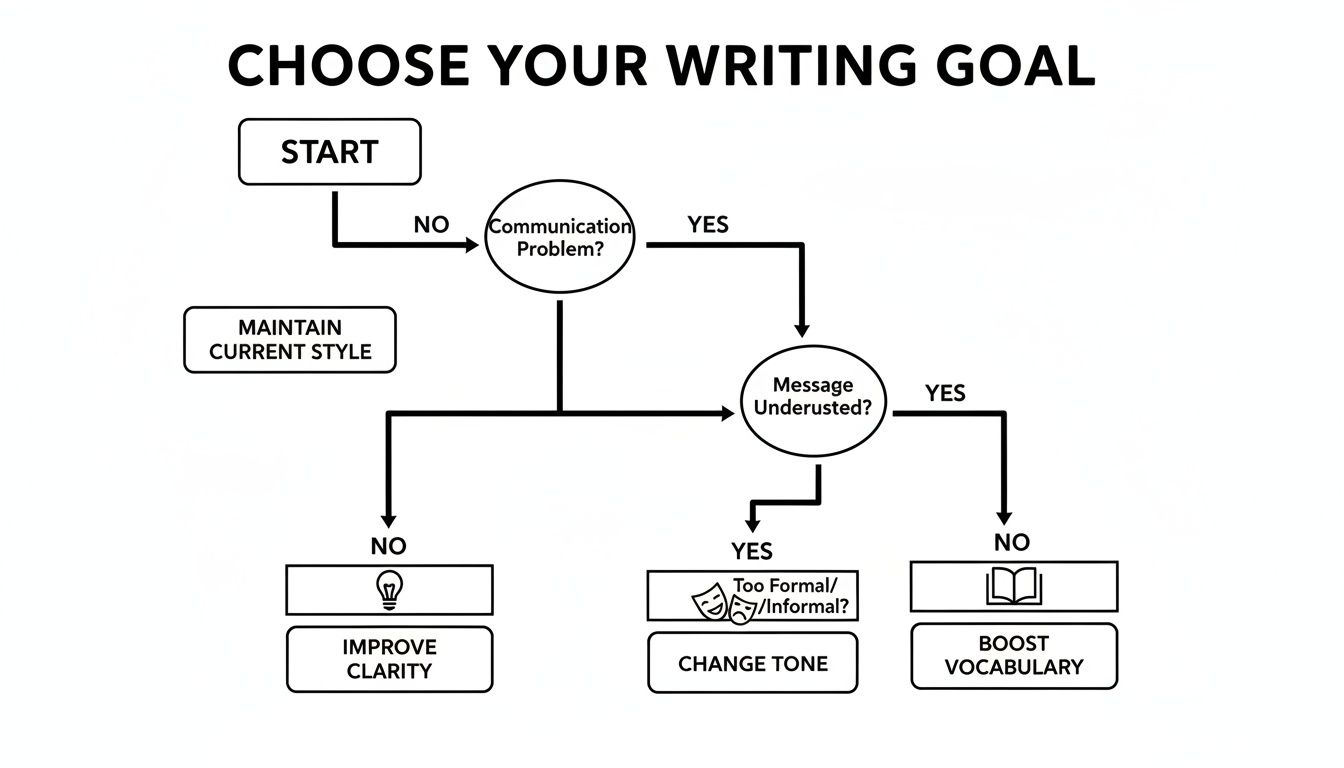
Whether you need to break down a complex topic for a general audience or dial up the persuasive power of your sales pitch, knowing your goal from the start makes everything easier.
Essential Features for Different Users
Once you've nailed down quality and goals, it's time to think about specific features. A feature that's a game-changer for one person might be useless to another. A developer's needs, for instance, are worlds away from a content creator's.
The best AI text enhancer isn't the one with the most features, but the one with the right features for your workflow. It should feel like a natural extension of your process, not another complex tool to learn.
So, let's look at which features are most valuable for different kinds of users. Understanding these priorities can help you zero in on the perfect tool.
Comparing AI Text Enhancer Features for Different Users
This table breaks down which features matter most depending on whether you're a student, marketer, or developer.
| Feature | Ideal for Students | Ideal for Marketers | Ideal for Developers |
|---|---|---|---|
| Plagiarism Checker | Crucial for ensuring academic integrity. | Helpful for verifying content originality. | Low Priority unless writing documentation. |
| Custom Style Guides | Helpful for maintaining a consistent academic tone. | Crucial for enforcing brand voice across all copy. | Helpful for consistent technical communication. |
| Integrations & API | Low Priority unless used in specific apps. | Important for browser extensions and CMS integration. | Crucial for building into custom applications. |
| Language & Dialect | Important for non-native speakers or specific variants. | Important for targeting global audiences effectively. | Low Priority as code is the primary language. |
By mapping your own needs against this table, you can see which features are non-negotiable. For a student, a built-in plagiarism checker is a must-have. For a marketer, an API and integrations that plug into their existing tools are far more important. The goal is to find the enhancer that fits seamlessly into your daily grind.
Weaving an AI Enhancer into Your Workflow
Let's be honest: a new tool is only useful if it actually fits into how you already work. Instead of seeing an AI text enhancer as something that takes over, think of it as a collaborator—a sharp-eyed partner that helps you produce better work, faster. The goal isn't to replace your voice, but to amplify it.
The trick is to treat the AI like a skilled assistant, not a ghostwriter. By bringing it in at just the right moments, you stay in the driver's seat. You get to decide what the final piece looks and sounds like, ensuring it’s still you, just a more polished and powerful version.
Stage 1: Start with Your Raw, Human Draft
Before any AI gets a look-in, the first and most important step is to write your draft yourself. This is where your authentic ideas, your unique perspective, and your core message come to life. Don't sweat the small stuff like perfect grammar or finding the most elegant word. Just get it all down on the page.
This "human-first" approach means the soul of the content is yours. The AI’s job is to come in later to sand the rough edges and add a coat of polish, not to build the furniture from scratch. It’s a crucial distinction for creating content that people actually trust and connect with.
Stage 2: The Technical Pass for a Solid Foundation
Once you have your draft, it's time to let the AI do its first pass. Think of this as the "technical edit." Copy your text into the enhancer and let it handle the nuts and bolts—the objective improvements that won't mess with your personal style.
Focus on letting the tool tackle these key areas:
- Grammar and Spelling: This is the low-hanging fruit. Let the AI zap any typos and grammatical slip-ups instantly.
- Clarity: Use it to spot those long, tangled sentences that make readers' eyes glaze over. It can help you find a more direct way to say what you mean.
- Conciseness: Every writer has filler words. The enhancer is great at flagging repetitive phrases and fluff, making your message punchier.
- Flow: Ask the AI to help smooth out the transitions between paragraphs. It can make the whole piece feel less clunky and more natural to read.
At the end of this stage, you’ll have a clean, solid draft ready for the more creative touches.
Stage 3: The Creative Pass for Style and Impact
Now that the technical stuff is sorted, you can move on to the "creative pass." This is where you use the AI text enhancer to really dial in the tone and style for your audience. Is this a formal business report, a friendly blog post, or a piece of marketing copy that needs to sell?
Here, you can use the tool to explore different ways of saying the same thing. Ask it to suggest more powerful verbs, adjust the tone to be more conversational or authoritative, or rephrase key sentences to make them hit harder. It’s like having a thesaurus and a style coach rolled into one, helping you find the perfect expression without losing your original meaning.
This four-part process, with AI assisting in the middle stages, can be visualized like this:
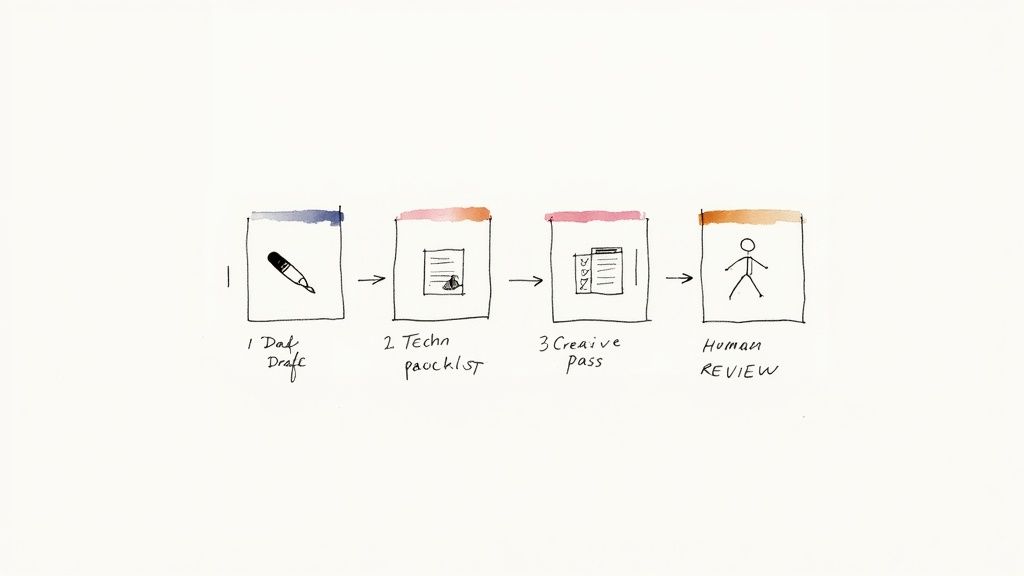
As the diagram shows, the process starts and ends with a human touch, which is non-negotiable.
Stage 4: The Final Human Review
This is it—the most important step of all. After the AI has done its part, you absolutely have to read through the entire piece one last time. This is where you put the you back in. We're talking personal anecdotes, little flashes of personality, and a final gut check to ensure every word feels right.
An AI can suggest a better word, but it can't verify a fact or share a personal story. The final layer of authenticity, fact-checking, and soul comes from the writer—and that's what makes content truly great.
The need for well-crafted text is exploding everywhere. For example, some e-commerce brands in the Asia Pacific region saw conversion rates jump by 25-35% after using AI to punch up their product descriptions. This shows just how powerful these tools can be when used correctly. If you’re refining AI-generated content, it’s also a great time to learn more about how to rewrite AI-generated text to make sure it’s a perfect fit for your brand's voice.
Using an AI Text Enhancer for SEO Success
Writing great content is just one part of the puzzle. If nobody can find it on Google, it might as well not exist. This is where an AI text enhancer becomes your secret weapon for search engine optimization (SEO), acting as the bridge between your brilliant ideas and what search engines need to see. The goal is to get you ranking higher and pulling in more organic traffic.
At its core, good SEO is about making content that pleases both people and search algorithms. An AI enhancer helps you strike that delicate balance by weaving your target keywords into the text naturally. Instead of just stuffing phrases in where they feel clunky, the tool rephrases sentences so the keywords fit right in. This keeps your writing smooth and readable while ticking all the right SEO boxes. For a deeper dive, check out our guide on SEO copywriting best practices.
Crafting High-Impact SEO Elements
Beyond just working keywords into your main text, an AI enhancer is a pro at polishing the small but crucial elements that really drive search performance. These are the first things people see on a search results page, so getting them right is non-negotiable if you want the click.
- Compelling Meta Descriptions: Think of your meta description as a tiny, powerful ad for your article. An AI tool can whip up several compelling options, each designed to pique interest and show a searcher exactly why they should click on your link over the others. A better description means a better click-through rate (CTR).
- Effective Ad Copy: When you're paying for ads, every word counts. An enhancer can generate multiple versions of ad copy in seconds, making it easy to A/B test and discover which message truly connects with your audience and gives you the best return on your investment.
- Engaging Blog Introductions: You’ve got about three seconds to convince a visitor to stick around. An AI tool can help you rewrite a flat introduction into something that grabs them by the collar, speaks directly to their problem, and makes them eager to read more. A strong hook is key to lowering your bounce rate.
This same principle applies to social media. For instance, a good AI Instagram Caption Generator can create engaging, searchable captions that help your posts get discovered. Every one of these small tweaks helps you build a stronger connection with your audience.
From Bland to Benefit-Driven: A Mini Case Study
Let's look at a real-world example. Say you have a basic, functional product description for a hiking backpack. It gets the job done, but it’s not inspiring anyone to click "buy" and it's certainly not ranking for competitive keywords.
Original Text:
"This hiking backpack is made of durable nylon. It has a 40-liter capacity and multiple compartments. It is good for hiking trips."
Now, let's run that through an AI text enhancer.
Enhanced Text:
"Engineered from rugged, weather-resistant nylon, this 40L hiking backpack is built to conquer any trail. Discover smart organization with strategically placed compartments, designed to keep your gear accessible on demanding treks. Elevate your next adventure with a backpack that offers both durability and all-day comfort—the perfect companion for serious hikers."
The difference is night and day. The enhanced version is not only more persuasive but it also works in the target keyword ("40L hiking backpack") and related concepts ("adventure," "treks," "hikers") in a way that flows perfectly. It speaks to what the user actually wants and needs, creating copy that both converts visitors into customers and signals all the right things to search engines. The result? Better rankings and real business growth.
Staying True to Your Voice and Upholding Your Standards
AI text enhancers are incredibly powerful tools, but like any tool, how you use them matters. There's a fine line between getting a helpful assist and letting the AI completely take the wheel. Rely on it too much, and you risk losing the very thing that makes your content special: your unique voice.

The best approach? Treat AI suggestions as just that—suggestions. Think of the tool as a brainstorming partner that can offer a different way to say something or a fresh angle to consider. But you are always the author. Your personal stories, unique insights, and distinct tone are what connect with readers, and no algorithm can fake that.
Keeping Your Writing Genuinely You
With so many people using AI, concerns about originality and plagiarism are valid. A recent industry report shows that around 70% of businesses are diving deeper into these tools, so the responsibility to use them ethically falls squarely on us, the creators.
To keep your work authentic, try this simple workflow:
- You Write First: Always start by putting your own ideas and voice on the page. Get that first draft done yourself.
- Edit Selectively: Don't just click "accept all." Be a discerning editor and only choose the suggestions that truly sharpen your writing without changing your style or core message.
- Add Your Flavor: After you’ve used the enhancer, reread your piece and sprinkle in personal anecdotes, specific examples, and opinions that could only come from you.
The real goal is to let AI refine your ideas, not create them for you. This keeps your work authentic and credible, proving you're a thoughtful creator who uses tools wisely.
Fact-Checking: Your Non-Negotiable Final Step
Here’s a critical point that’s easy to miss: AI models don't know things. They are incredibly sophisticated prediction machines, guessing the next word in a sequence. This means they can sometimes create "facts" that sound completely legitimate but are totally wrong. It’s a phenomenon called "hallucination."
That's why you have to double-check any statistic, claim, or factual statement the AI suggests. Always cross-reference with trusted sources. This human review is absolutely essential for building and keeping your audience's trust.
And if you’re focused on originality, it’s also smart to know how to paraphrase without plagiarizing. Your credibility is on the line, so take the time to get it right.
Got Questions? We've Got Answers
Even after seeing what an AI text enhancer can do, you probably still have a few questions about how it all works in the real world. That's completely normal. Let's tackle some of the most common ones so you can start using these tools with confidence.
Will Using an AI Text Enhancer Tank My SEO?
Not at all—as long as you use it wisely. Google’s main job is to reward content that genuinely helps the reader. A good AI text enhancer boosts readability, clarifies your message, and makes your writing more engaging. These are all things that search engines love to see.
The trick is to use the tool to enhance your work, not to just crank out soulless, automated articles. Your expertise and unique perspective should always be the heart of your content. The AI is just there to help you present it better.
Can an AI Really Capture My Unique Writing Style?
It can get surprisingly close, but a human touch is still the secret ingredient. Many of the more sophisticated tools can learn your tone by analyzing writing samples you feed them or by following specific style instructions you set.
But for the best results, think of the AI's output as a really strong first draft. It gives you a fantastic starting point, but you should always come in for the final polish. This ensures your authentic voice is front and center, blending the best of AI efficiency with human personality.
An AI text enhancer is a polisher, not a ghostwriter. The final piece should always sound like you—just the sharpest, most impactful version of you. Your voice is what makes your content unique.
Is Using an AI Text Enhancer a Form of Plagiarism?
Nope. Using an enhancer to improve your own original writing is not plagiarism. Plagiarism is when you pass off someone else’s work or ideas as your own. An AI text enhancer, on the other hand, is all about refining your ideas and sentences.
You only run into trouble if you use an AI to generate huge chunks of text from nothing and then claim it as your own without significant changes. The safe and ethical approach is simple: always start with your own draft and use the AI as a refining tool.
Are These Tools Safe to Use With Confidential Information?
This is a big one, and it all comes down to the tool's privacy policy. A lot of free, web-based enhancers might use the text you enter to train their AI models. If you're working with sensitive business documents, private research, or anything confidential, that's a risk you can't afford to take.
For anything sensitive, you absolutely must choose a professional-grade AI text enhancer that has a rock-solid privacy policy. Look for one that explicitly states your data is never stored or used for AI training. Always, always read the terms before you paste anything important.
Ready to start writing with an AI partner that has your back? Rewritify helps you refine your text for clarity, style, and impact—all while keeping your data private and your unique voice intact. Transform your drafts into polished, professional content today.
Relevant articles

Learn how to humanize AI generated text with proven strategies. Move beyond robotic writing to create authentic, engaging content that connects with readers.
Learn a responsible workflow for using a plagiarism checker and rewriter. Create original, high-quality content that maintains your voice and boosts SEO.
Looking to rewrite my essay for free? Discover 12 top tools and methods for improving clarity, originality, and flow without spending a dime.

Discover 10 powerful examples of visual imagery from literature, ads, and design. Learn how to use visual language to make your content more compelling.
Asking 'does undetectable AI work?' This guide reveals real test data on bypassing AI detectors. See if you can actually fool systems like Turnitin and Google.
Discover 10 actionable content repurposing strategies to maximize your reach and ROI. Turn blogs, webinars, and data into powerful marketing assets.