How to Check for Plagiarism A Practical Guide for Writers
Learn how to check for plagiarism with confidence. Our guide covers the best tools, manual techniques, and a clear workflow to ensure your content is original.
To really get a handle on plagiarism, you can't just rely on one method. The most effective approach combines the power of automated software with the nuance of manual verification. Your first pass should always be with a reliable plagiarism checker to flag potential issues. After that, it’s up to you to dig in and manually investigate what the software found.
Why Plagiarism Checks Are Your Best Defense
In a world drowning in content, making sure your work is original is more than just about following the rules—it's about protecting your reputation. Whether you're a student turning in an essay, a content creator hitting 'publish' on a blog post, or a researcher sharing your latest findings, originality is what makes people trust you.
Think of a plagiarism check less like a final, annoying chore and more like a crucial quality control step, just like proofreading for grammar and typos. It's a proactive move.
With how easy it is to find information and the rise of AI-generated content, accidentally plagiarizing is a very real risk. A simple copy-paste mistake while you're taking notes or a sentence that’s paraphrased a little too closely to the source can be enough to compromise your work’s integrity.
Protecting Your Professional and Academic Reputation
The fallout from plagiarism goes way beyond a bad grade or an SEO penalty. For any professional or business, publishing content that isn't original can wreck your brand's authority and make your audience question everything you say. For academics, it's even worse—it can lead to retracted papers and career-ending damage.
A solid plagiarism check is your first line of defense. It gives you the power to:
- Verify Originality: Make sure your ideas are truly being expressed in your own words.
- Catch Citation Errors: Spot those accidental moments where you forgot a source or cited something incorrectly before anyone else does.
- Build Trust: Give your audience content they know is authentic, reliable, and created with integrity.
- Sharpen Your Writing: The act of reviewing and rewriting flagged sections naturally makes you a better writer and a more careful researcher.
The Growing Need for Diligence
The market numbers back this up. The global plagiarism detection market hit USD 1.47 billion in 2024 and is still climbing, showing a huge worldwide focus on integrity. Some studies even suggest that up to 15% of online articles have plagiarized content, so the need for a good checking process is obvious.
It’s no wonder that the best tools now scan databases with over 70 billion web pages and academic papers to find matches. You can find more insights about the plagiarism detection market and its growth on Dataintelo.
Key Takeaway: Stop thinking of plagiarism checks as a punishment. See them as a proactive quality assurance step that’s essential for maintaining your integrity. It’s a fundamental part of creating high-quality, trustworthy content, no matter your field.
Ultimately, learning how to check for plagiarism is about taking pride in what you create. It shows you’re committed to ethical standards and that you value your own voice—and the work of others. This process ensures your final piece is not just polished, but authentically yours.
2. Choosing Your Plagiarism Checking Toolkit
Alright, let's talk about the tools of the trade. To do this right, you need a strategy that mixes the raw power of software with your own human intuition. Think of it as a one-two punch: automated tools cast a wide net, and your manual checks provide the critical eye.
Your First Line of Defense: Automated Checkers
Automated tools are the workhorses. They’re designed to crawl through billions of web pages, academic papers, and published works in seconds to flag potential matches. But they're not all built the same. You'll generally find them in three flavors.
To help you decide what’s right for your needs—whether you're a student on a budget or a professional managing a content team—let’s break down the key differences.
Automated Plagiarism Checkers: A Feature Comparison
| Feature | Free Checkers (e.g., SmallSEOTools) | Freemium Checkers (e.g., Grammarly) | Premium Checkers (e.g., Turnitin, Copyscape) |
|---|---|---|---|
| Database Scope | Primarily public web pages. Often limited. | Broader than free; includes public web and sometimes proprietary databases. | The most comprehensive: vast academic, publisher, and web databases. |
| Scan Depth | Surface-level checks. May miss subtle paraphrasing. | Deeper analysis, often integrated with writing and grammar suggestions. | Deep, source-matching analysis with detailed similarity reports. |
| Usage Limits | Strict word or document limits per day. | Limited free checks; unlimited for paid subscribers. | Typically subscription-based, with plans based on volume or users. |
| Best For | Quick checks of short documents, blog posts, or casual use. | Students, bloggers, and regular writers needing an all-in-one tool. | Academic institutions, publishers, and businesses where originality is critical. |
| AI Detection | Rarely included. | Often available in the premium tier. | Standard feature in leading platforms, often with high accuracy. |
As you can see, you get what you pay for. While a free tool is handy for a quick pass, relying on it for serious work is a gamble.
A Quick Tip from Experience: The single most important feature to look at is the database size. A checker that only scans public websites can give you a false sense of security. It won't find text borrowed from academic journals or paywalled content, which is a massive blind spot.
The technology behind these tools is getting smarter by the day. In fact, the anti-plagiarism software market for education is expected to grow by a staggering $4.92 billion between 2024 and 2028. This boom is fueled by AI and a growing demand for academic integrity. The issue is serious enough that some reports show 23% of law enforcement agencies use these tools when investigating academic fraud. You can explore the research on AI's impact on plagiarism software to see just how fast this space is moving.
The Essential Follow-Up: Manual Verification
No piece of software is infallible. Automated tools can sometimes flag common phrases or perfectly cited quotes, creating false positives. This is where your brain and a bit of detective work become essential.
One of the simplest and most powerful techniques is the targeted web search. Does a sentence just feel "off" or out of place? Copy it, paste it into your search engine, and wrap it in quotation marks. This forces an exact-match search and will often pull up the original source in seconds.
Next, you need to be your own fact-checker. Pull up your sources and ask yourself a few questions:
- Does the source actually say that? Double-check that the information you've cited is really there.
- Are my quotes perfect? Make sure every directly quoted word is inside quotation marks and transcribed exactly.
- Is my paraphrasing truly original? Or did you just swap out a few words with a thesaurus? Be honest with yourself. It needs to be your own sentence structure and phrasing.
Sometimes, you just need a simple side-by-side view. That’s where general-purpose text comparison tools come in handy. They are fantastic for putting your paraphrased text next to the original source to see just how similar they really are, highlighting every little overlap.
By combining the broad scan of an automated checker with these focused, manual techniques, you build a rock-solid workflow. It’s the best way to catch everything from clumsy copy-pasting to cleverly disguised plagiarism, giving you total confidence in your work.
A Smart Workflow for Checking Your Content
Having a great plagiarism checker is one thing, but knowing how to use it effectively is another. You can't just upload a document, glance at the percentage, and call it a day. To do this right, you need a repeatable process that combines the power of technology with your own critical eye.
I think of it as a three-part quality check. First, you prep the document to make sure the scan is clean and accurate. Then, you let the automated tool do its thing, casting a wide net to flag potential problems. The final, and most important, step is the manual review, where you apply context and common sense to the results.
This approach takes you beyond a simple score and helps you truly understand your work's originality.
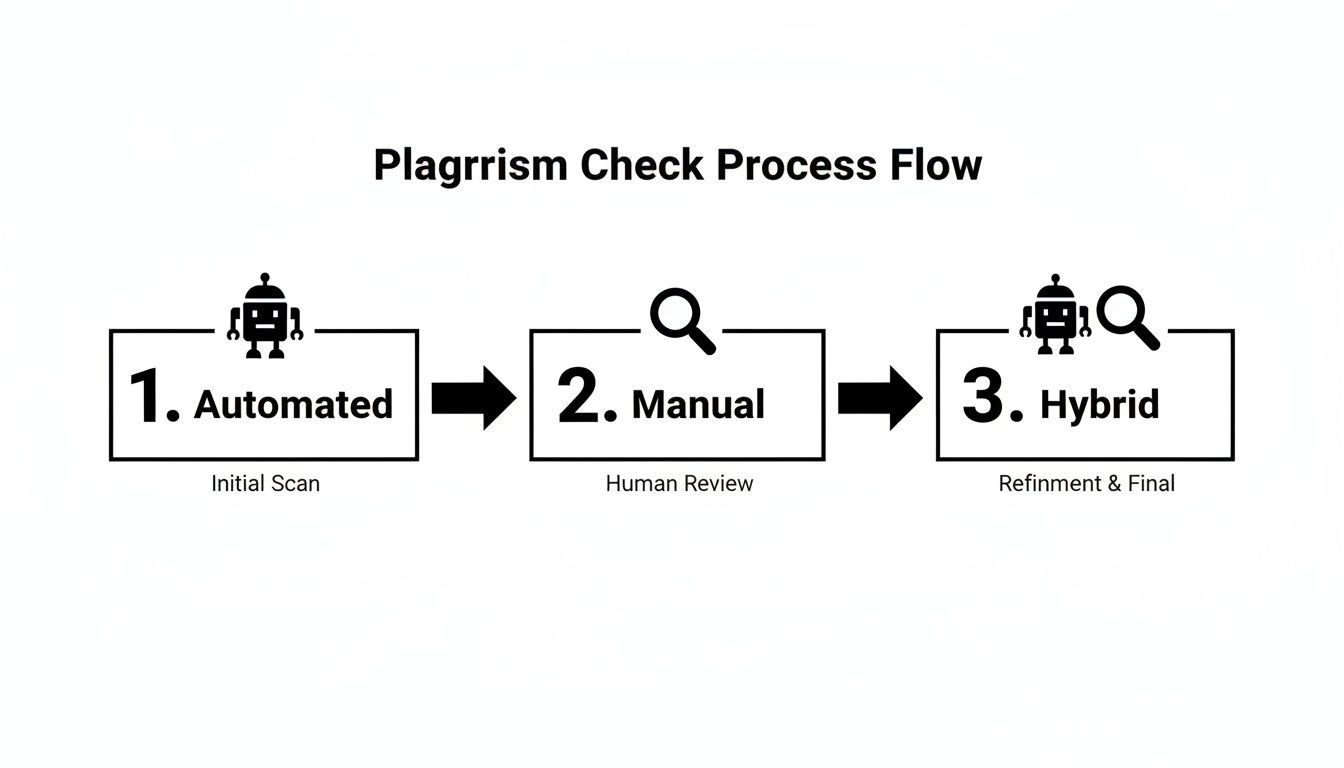
As you can see, the most reliable method is a hybrid one. It leverages the speed of a machine with the nuanced understanding only a human can provide.
Prep Your Document for an Accurate Scan
Before you even think about hitting "upload," a few minutes of prep work can save you from a sea of false positives. Automated tools are smart, but they can’t always tell the difference between a copied paragraph and your bibliography.
Start by temporarily removing any sections that are guaranteed to flag a match but aren't part of the core text. This means your works cited page, reference list, or bibliography should be the first to go.
You might also consider taking out:
- Long, standard titles: If you're referencing a well-known law or a famous report, the title will almost certainly get flagged.
- Personal details: Your name, school, or course information can sometimes match other documents in a shared database.
- Verified direct quotes: If you’re already 100% certain your quotes are formatted and cited correctly, removing them can help the final report focus only on potential problem areas.
This quick cleanup gives the plagiarism checker a much cleaner slate, allowing it to focus on the actual substance of your writing. The result is a more useful and less cluttered similarity report.
Run the Automated Check
With your document prepped and ready, it's time to let the software work its magic. This is the broad-spectrum analysis designed to catch everything from entire paragraphs lifted from a source to lazy paraphrasing that still mirrors the original.
Just copy and paste your text or upload the file. The tool will then meticulously compare your document against its massive database of websites, academic journals, and publications. This can take anywhere from a few seconds to a couple of minutes, depending on your document's length.
My Advice: Don't wait until the very end to run a check. Get into the habit of checking your work in chunks as you write. It's far less painful to fix a small issue on the fly than to face a huge revision task right before a deadline.
Once the scan finishes, you'll get a similarity report. This report is your starting point, but remember—the overall percentage is just a number. The real work starts now.
Layer in Manual Spot-Checks
An algorithm can’t grasp intent, context, or nuance. That's why the manual review is, without a doubt, the most critical part of this entire process. Your job is to go through each flagged passage and decide: is this a real problem, or just a false positive?
I always start with the highest-percentage matches first. The report will highlight the text and link directly to the source it found. Your first step should be to click through and examine every single one of those sources.
As you review, ask yourself these questions:
- Is this a direct quote? If it is, is it properly enclosed in quotation marks and attributed with the correct citation style?
- Is this just a common phrase? Tools often flag generic industry jargon (like "return on investment" or "qualitative data analysis"). These are almost always fine to ignore.
- Is this poorly paraphrased? This is a huge red flag. If your sentence uses the same basic structure and a bunch of the same keywords as the source, it absolutely needs to be rewritten from scratch.
- Is the source cited correctly? Even if you've paraphrased brilliantly, you still need an in-text citation or footnote to give credit where it's due.
Here’s a powerful trick for checking sentences that feel a bit off but weren't flagged by the software. Copy the suspicious sentence, paste it into Google, and wrap it in "quotation marks". This forces Google to search for that exact phrasing. You’ll know in an instant if it exists anywhere else online. This simple manual step can uncover problems that even the best tools sometimes miss.
How to Make Sense of a Similarity Report
So, you've run your document through a plagiarism checker, and a percentage pops up on the screen. It's natural to feel a jolt of anxiety if that number seems high, but let me tell you from experience: the similarity score is only the beginning of the story.
What truly matters is the context behind that number.
Think of it this way: a 20% score might be perfectly acceptable if it's made up of properly cited quotes and common, everyday phrases. On the flip side, a seemingly low 5% could be a major issue if it points to a single, unattributed paragraph copied verbatim from another source. Learning to read these reports is a skill, one that moves you beyond a gut reaction to a number and into a critical assessment of your own work.
There's No Magic Number for "Safe"
Let’s get one thing straight right away—there is no universal "good" or "bad" similarity score. Many universities or publications aim for a score under 15%, but this is just a guideline, not a hard-and-fast rule.
The real goal is always 0% genuine plagiarism. The report is simply a tool that highlights matching text; it's your job to figure out why it matches.
Key Insight: Stop worrying so much about the final percentage. Instead, treat the report like a map. Each highlighted passage is a point of interest that needs a quick investigation. Ask yourself one simple question for each match: "Is this text used correctly with a proper citation, or is it a problem I need to fix?"
This mindset is what separates a professional from an amateur. It's the difference between spotting coincidental overlap and uncovering intellectual theft.
Differentiating Red Flags from False Alarms
A good similarity report doesn't just give you a number; it shows you the matches, usually color-coded and linked directly to the original source. This is where your real work begins. You're not just looking at highlighted text; you're looking for patterns.
Here's what you'll typically run into and what it means:
- Large, Unbroken Blocks of Text: This is the most glaring red flag. If you see an entire paragraph highlighted that isn't wrapped in quotation marks and cited, you’ve got a serious problem on your hands. Fix it immediately.
- "Patchwork" or Mosaic Plagiarism: Be on the lookout for sentences where a few words have been swapped for synonyms, but the core sentence structure and key ideas are identical to the source. This is a lazy and obvious form of plagiarism that checkers are getting very good at catching.
- Common Phrases and Jargon: Your report will almost definitely flag things like "return on investment" or "qualitative research." These are just common phrases, not plagiarism. You can almost always ignore these false positives.
- Properly Cited Quotes: If a highlighted section is correctly formatted as a quote with a clear citation, that’s great! The tool is simply doing its job by confirming it found the original source you referenced.
Before diving into the report, it helps to have a framework for what different scores might mean in practice. The context of the matches tells you everything you need to know.
Similarity Score Scenarios And What They Mean
This table gives you a practical look at how to interpret different scores based on the type of content the checker has flagged.
| Similarity Score | Potential Cause | Action Required |
|---|---|---|
| 0-10% | A few common phrases, properly cited quotes, or a bibliography/references section. | Low Priority: Quickly review the highlighted sections. If they are just common terms or citations, no action is needed. |
| 11-25% | May contain several cited quotes, significant industry jargon, or a few poorly paraphrased sentences that are too close to the original. | Review Required: Examine each match. Ensure all quotes are cited. Rewrite any sentences that are "patchwork" paraphrasing. |
| 26-50% | Often indicates large blocks of copied text, significant "patchwork" plagiarism, or heavy reliance on a few sources. | High Priority: This suggests a structural problem. You'll likely need to rewrite multiple sections and check all citations. |
| 51%+ | A strong indicator that substantial portions of the document have been copied directly from other sources without attribution. | Critical: The document needs a complete overhaul. This score points to fundamental issues with plagiarism that must be addressed from the ground up. |
As you can see, a low score doesn't automatically mean you're in the clear, and a higher one isn't always a catastrophe. It all comes down to the why.
Interpreting High Sentence Similarity
Modern tools don't just find copy-pasted blocks; they can analyze sentence DNA. Research has found that genuinely plagiarized student work often shows an average sentence similarity of 78%, while truly original writing is closer to 45%. This is a massive gap, and it highlights why sophisticated detection is so important. In fact, 38% of faculty admit they have trouble spotting well-disguised paraphrasing, which is why these tools are becoming essential. You can explore the full research on plagiarism detection to get a better sense of these trends.
For writers, it's also crucial to walk the fine line between good paraphrasing and accidental plagiarism. Our guide on the difference between paraphrasing and plagiarism can give you more clarity on this.
Ultimately, reading a similarity report is a blend of technology and human judgment. The software gives you the data, but you provide the critical thinking. By carefully analyzing every single match, you can be confident that your work is not only polished and credible but entirely your own.
Writing Strategies That Prevent Plagiarism

Ultimately, the best way to clear a plagiarism check is to write original work from the start. While checkers are great for catching accidental slip-ups, the best defense is a good offense—a writing process that builds in originality from day one.
This isn't just about dodging penalties. It's about developing the habits and skills to produce work that is genuinely, confidently your own. Think of originality as the foundation of your entire workflow, not just a final hurdle to clear before you submit.
Master Paraphrasing and Summarizing
Good paraphrasing goes way beyond just swapping out a few words for synonyms. It’s about truly understanding the source material, internalizing its core message, and then explaining that concept entirely in your own voice and sentence structure. You're translating an idea, not just rearranging someone else's words.
A simple but powerful way to practice this is the "read, hide, write" method. Read a passage you want to use, then physically cover it or turn away. Try to explain the main idea out loud, as if you were teaching it to a colleague. Then, write down your explanation without peeking at the original. This little trick forces you to process the information instead of just shuffling it around.
My Go-To Tip: Focus on summarizing the idea, not the words. When you're taking notes, never copy and paste full sentences. Instead, jot down the core concepts and add your own thoughts right next to them. This creates a natural buffer between the source text and your own writing from the very beginning.
Build a Disciplined Note-Taking System
Speaking of notes, this is where so many accidental plagiarism issues get their start. A messy research process filled with copied text makes it incredibly easy to forget where an idea came from. To head this off, your note-taking needs to be meticulous.
Find a system that works for you, but make sure it includes these non-negotiable rules:
- Cite Immediately: The second you grab a fact, quote, or concept from a source, add the citation right there in your notes. Don't fall into the trap of telling yourself you'll "find it later."
- Use Visual Cues: You need to clearly distinguish your own thoughts from the source material. I like to put all direct quotes in quotation marks and use a different font color for any text I copy verbatim.
- Track Everything: Get comfortable with a citation manager like Zotero or Mendeley. These tools are lifesavers—they organize your sources and can generate a bibliography for you, saving you from a massive headache down the line.
These habits are your safety net. They ensure that every piece of information you use can be traced back to its origin, which is the cornerstone for anyone looking to learn more about how to avoid plagiarism in their writing.
Use AI Writing Assistants Ethically
AI can be a fantastic brainstorming partner, but it should never be the final author. The key is to treat it like an assistant, not a ghostwriter. It can help you structure an argument or get past writer's block, but the final text has to be filtered through your own critical thinking and unique voice.
The rise of AI has completely changed the game. The global plagiarism detection market hit USD 1.42 billion in 2024, partly because modern checkers now have to account for AI-assisted writing. It's become crucial to understand how to use tools for rewriting, including leveraging AI for effective paraphrasing without crossing ethical lines.
This is a real challenge, especially since 38% of educators admit they find it difficult to spot sophisticated paraphrasing. With the content detection market projected to explode to USD 31.42 billion by 2029, tools that help refine AI drafts into original work are no longer a luxury—they're essential.
This is where a tool like Rewritify can be so helpful. You can take a rough, AI-generated draft and use its specialized modes to transform it into polished, human-quality writing. It helps you preserve your intended meaning while ensuring the final text is truly original. It’s about using technology to elevate your own work, not replace it.
Frequently Asked Questions About Plagiarism Checks
Even when you have a solid process down, you're bound to run into some tricky situations during a plagiarism review. Let's walk through some of the most common questions that pop up and get you some clear, practical answers.
What’s an Acceptable Plagiarism Score?
This is probably the number one question I get, and the honest answer is, there's no magic number. The context of the matches is far more important than the percentage itself. A document's integrity just can't be boiled down to a single score.
For example, many universities are perfectly fine with a similarity score under 15% if those matches are just properly cited quotes, a bibliography, or standard industry jargon. On the flip side, a score as low as 5% could be a major red flag if it points to a single, crucial paragraph lifted verbatim from another source without any credit.
The Key Takeaway: Don't obsess over the final percentage. Instead, dig into the details of the matches. A high score full of legitimate citations is often fine, while a low score from a single unattributed source is a serious problem. Always check the specific guidelines from your school, publisher, or client.
Can I Plagiarize Myself by Reusing Old Work?
You absolutely can. It’s called self-plagiarism, and it’s a bigger deal in academic and professional circles than most people realize.
Think about it this way: you write a fantastic research paper for one class. If you turn around and submit that same paper (or big chunks of it) for a different class without getting the green light from both instructors, that's self-plagiarism.
The same rules apply in the professional world. A researcher can't just copy and paste large sections from one of their published articles into a new one without citing the original. Doing so misleads readers into believing the material is brand new. The bottom line is to be transparent and cite your own previous work just as you would any other source.
How Do Plagiarism Scanners Handle AI-Generated Text?
This is where things are getting interesting. Many of the big plagiarism checkers are now building in AI detection, but the results can be a mixed bag. These tools are trained to spot patterns that often give AI away—things like overly predictable sentence structures, slightly odd word choices, or a general lack of human personality.
But let's be clear: these detectors are not foolproof. They can, and do, produce false positives, sometimes flagging perfectly human writing as AI-generated. It's a constant cat-and-mouse game. As AI writing tools get more sophisticated, the detectors have to hustle to keep up.
The smartest approach is to use AI as an assistant, not as a replacement for your own brain. Let it help you brainstorm, build an outline, or get a rough draft on the page. After that, your job is to step in and rewrite everything in your own voice. For anyone curious about how this technology works under the hood, our article exploring if undetectable AI really works is a great place to start.
Will a Plagiarism Checker Keep a Copy of My Document?
This is a critical privacy concern, and the answer really depends on which tool you’re using.
University & Institutional Tools: Software like Turnitin, a staple in academia, usually adds student papers to its massive private database. This is how they check new submissions against past ones to catch students reusing papers.
Free Online Checkers: This is where you need to be careful. Some free tools have sketchy privacy policies (or none at all). They might save your work, sell your data, or even publish your document online. For anything sensitive, confidential, or proprietary, using these services is a huge gamble.
Your best bet is to stick with reputable services that have a crystal-clear privacy policy. Look for one that explicitly says they won't store, sell, or share your work. It only takes a minute to read the terms, and it’s well worth it to protect your intellectual property.
Ready to move beyond checking and start perfecting your writing? Rewritify turns your drafts and AI-generated text into clear, original content that sounds human. Enhance readability, ensure originality, and maintain your authentic voice with a single click. Try it for free at https://www.rewritify.com.
Relevant articles
Are AI detectors accurate? This guide unpacks the data, revealing why 99% claims are misleading and how to navigate the risks of false positives in your work.
Explore turnitin similarity score meaning and how it reflects originality, citation practices, and steps to improve your paper before submission.
Discover the best AI writing detector to ensure content authenticity. We tested and ranked 12 top tools for accuracy, false positives, and specific use cases.
Learn a responsible workflow for using a plagiarism checker and rewriter. Create original, high-quality content that maintains your voice and boosts SEO.
Does Turnitin check for AI? Yes. We explain how its detection works, why false positives happen, and how to use AI ethically to protect your academic integrity.
Difference between paraphrasing and plagiarism explained with clear examples and actionable tips to protect academic integrity.